
How to Choose a Vocabulary App for iPhone & iPad
Open the “Study” folder on almost any language learner’s phone and we will usually find two or three different flashcard apps sitting side by side. The first two days with a new app always feel great: maybe we breeze through a hundred multiple-choice cards on the train and feel unstoppable, or maybe we spend a Sunday afternoon importing a shared Anki deck and tweaking interval multipliers.
The trouble usually waits until the second week. We sit down with a real journal article or practice exam and realize that the words we answered so quickly inside the app still look unfamiliar on paper—because our thumb had quietly learned to pick the longest option on screen without ever registering how the word sounds or behaves in a sentence. Even worse, if midterms, work travel, or a cold pulls us away for four or five days, reopening the app greets us with a broken streak banner and a wall of four hundred overdue cards.
Four common ways to study at a glance
Every vocabulary tool fits a different study situation: Anki shines when medical or law students build custom cloze cards from lecture slides, Duolingo introduces playful travel phrases for absolute beginners, and traditional drill apps help with last-minute visual skimming. If you want ready-to-study English or Japanese wordbooks on iPhone and iPad with active recall in 15 minutes a day, here is how they compare at a glance:
| Feature | DIY decks (Anki / Quizlet) | Exam drill apps | Streak games (Duolingo) | Mocavoca |
|---|---|---|---|---|
| Ready-to-study exam & frequency wordbooks | — (Manual setup) | ✓ | — (Fixed linear path) | ✓ (20+ books, independent logs) |
| One-screen watercolor, audio & sentence | — (Front/back flip) | Partial (Stock photos) | — | ✓ (All on one screen) |
| Meaning + blind audio + full spelling checks | — (Self-graded buttons) | Partial (Multiple choice) | Partial (Word-bank tiles) | ✓ (4-word micro-batches) |
| Daily review cap & no streak penalties | — (Uncapped backlog) | — (Overdue pile-ups) | — (Streak resets / freezes) | ✓ (Capped queue, 0 fines) |
| Zero ads & no paid coin packs | ✓ (Paid app or Plus tier) | — (Ad & course pop-ups) | — (Ads & gem IAPs) | ✓ (0 ads, study-only coins) |
What to look for on iPhone and iPad
If we need to memorize anatomy diagrams or specialized seminar slides that don’t exist in any published corpus, building a custom Anki deck is still worth the weekend setup. When our goal is mastering core English frequency lists (NGSL, NAWL), exam vocabulary (IELTS, TOEFL, CET-4/6), or beginner Japanese (JLPT N5), three details make all the difference in day-to-day study.
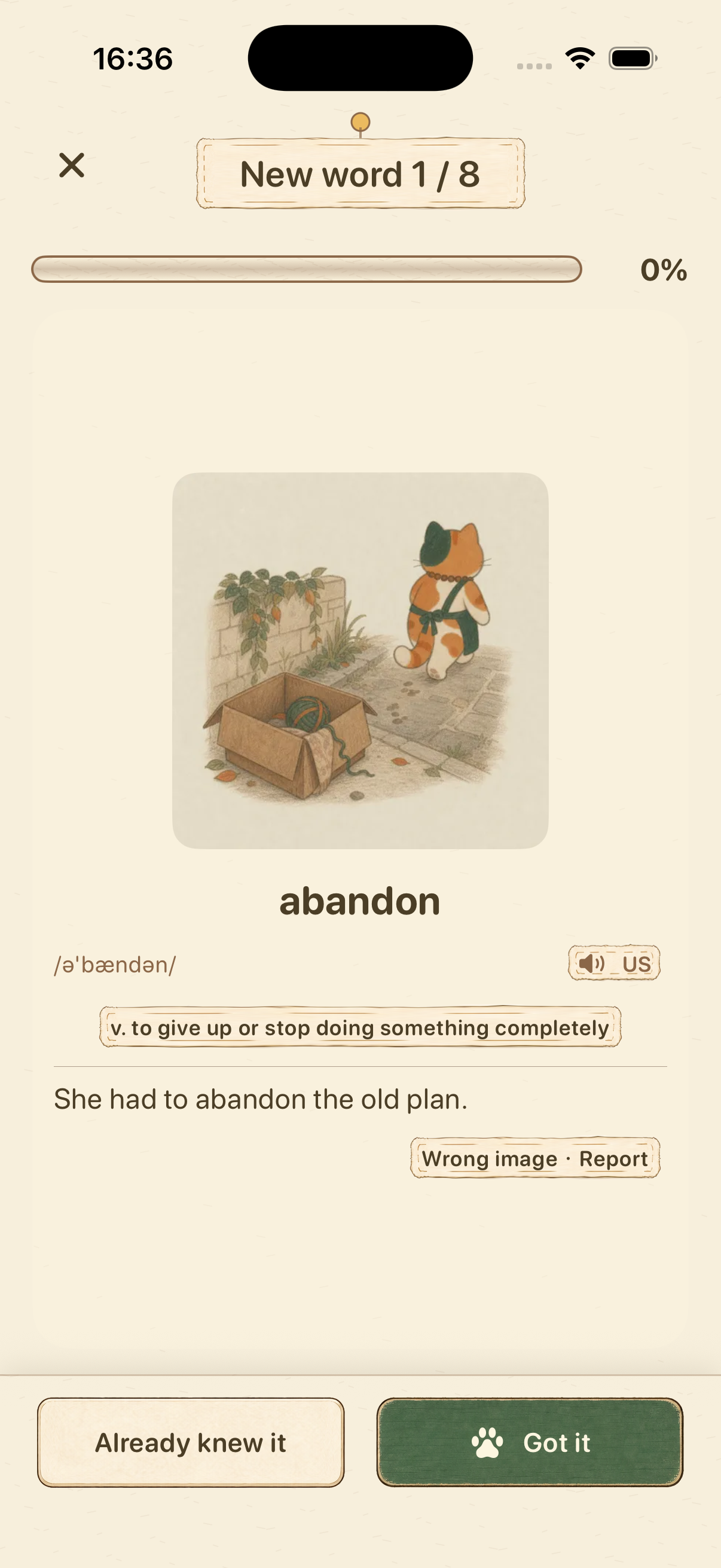
Start with how a card introduces a new word before testing us. Traditional flashcards put a bare word on the front and a short gloss on the back, which nudges us into memorizing isolated letter strings. In Mocavoca, every word opens on a single screen with its hand-painted watercolor scene, pronunciation audio, part-of-speech definition, and full example sentence—and then checks our recall in 4-word groups across meaning selection, blind listening without text on screen, and full keyboard spelling.
Next, check what happens when we switch between wordbooks. Many of us read the 953-word Academic Word List (NAWL) on weekdays for university classes, switch to IELTS or TOEFL for exam prep, or wind down with five cards from JLPT N5 Japanese at night. Mocavoca keeps a separate record book and 1–3–7–14–30 day review calendar for every wordbook on the shelf, so switching books never resets our place.

Finally, look at how the app treats a busy week. In Mocavoca’s watercolor cat café, there is no top-up button to buy coins or cat treats with real money; every armchair, floor lamp, and bowl of cat food for Mochi, Latte, Sora, and Luna is earned strictly by studying words. And once a piece of furniture is placed in the room, it stays there for good—even if we miss five days for finals or a trip, our coins and furniture remain untouched, and Today’s Plan simply serves a calm 15-minute slice of due reviews when we step back inside.

Try Mocavoca on iPhone and iPad
Includes 20+ built-in frequency and exam wordbooks, three-way active recall quizzes, and a 1–3–7–14–30 day review schedule. Free to download on the App Store; full access to all wordbooks and learning features requires an auto-renewing monthly subscription.

View download and subscription details
Frequently asked questions
Why do learners switch to Mocavoca from Anki or Quizlet on iPhone?
Anki on iOS requires manual deck curation and relies on subjective self-grading buttons, while Quizlet places long-term spaced repetition behind paid tiers. Mocavoca provides ready-to-study corpus and exam wordbooks, illustrated one-screen cards, objective three-way quizzes (meaning, blind audio, and spelling), and a daily review cap right out of the box.
Can I buy cat café coins or cat treats with real money?
No. Mocavoca has zero coin packs and zero microtransactions. Every coin used to decorate your cat café and every cat treat used for feeding animations is earned by studying new words and completing spaced repetition reviews.
Explore next
Preview the Academic Word List (NAWL 953 words), IELTS & TOEFL vocabulary, or JLPT N5 Japanese selection, see how the 1–3–7–14–30 spaced repetition schedule works, or read How Many New Words a Day? Calculate Your Day-10 Review Load.